This is the official AnKing Overhaul Deck for Step 1 & 2 Version 12 (V12). Please reference the following materials if you would like to learn more:
Read the AnKing deck wiki here, where you can learn what the tags mean, the history of the deck, and see frequently answered questions.
Want to see what kind of changes are happening to the deck? Check out the updates log which we update monthly :): www.theanking.com/decks/step/updates
Rules for making suggestions (failing to follow these rules will result in automatic rejection): www.theanking.com/decks/step/suggestions
Thank you to our incredible maintainer team: www.theanking.com/decks/step/maintainers
 Intro to the Deck
This deck is the best deck for USMLE Step 1 & Step 2 and is mostly comprehensive. It can also be used for USMLE Step 3.
It combines the best parts of different acclaimed medicine related decks and is probably the best organization currently available. It is also infinitely updatable via AnkiHub so we as a medical school community can continually bring it up to date for new content.
 What decks is this based on?
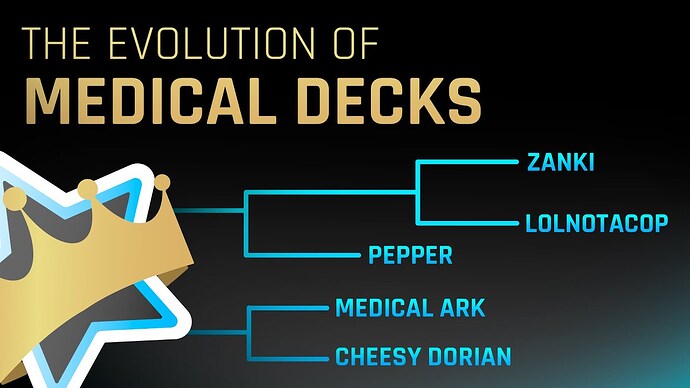
Step 1
- BlueGalaxies Zanki Deck (which is based on the Original Zanki deck)
- Lolnotacop
Step 2
- Zanki Step 2
- Cheesy Dorian (Based on the original Dorian)
- MedicalArk
With additional content (not cards) taken from:
- Pepper Pharm & Micro
- UltraZanki
- Numerous other small updates shared on reddit since 2018
 What is AnkiHub?
AnkiHub is a web application that fully integrates with Anki to facilitate mass collaboration, real-time updates, and much more, all while still allowing users to customize their Anki cards. Every time a change is accepted, you get instant updates!
↓ Watch this 1 minute video explanation below ↓
 How the decks were made - what resources were used
Step 1
- BlueGalaxies Zanki Deck (which is based on the Original Zanki deck)
- Mix of Costanzo Physiology and First Aid for physiology
- Pathoma for pathology
- Sketchy micro & pharm
- Kaplan neuro for the neurology section
- BlueGalaxies added many edits and new cards based on UWorld and NBME content
- BlueGalaxies added new cards for the Pathoma Neoplasia section and micro/pharm to fill in what Zanki didn’t do
- Lolnotacop
- Used Sketchy micro & pharm to fill in everything that Zanki didn’t do
- Also filled in Pathoma Neoplasia section that Zanki didn’t do
 The duplicates between BlueGalaxies and Lolnotacop has mostly been resolved and the better cards were saved while the other duplicate was deleted.
Step 2
- Zanki Step 2
- Made a basic set of step 2 cards based mostly on UWorld
- Cheesy Dorian (Based on the original Dorian)
- Dorian built upon Zanki Step 2. Cheesy Dorian added even more updates. Used a variety of resources like amboss, case files, exam guru, ome, step up to medicine, usptf guidelines, uva questions, high yield facts, uwise, uworld, etc. See the
Original_Deckstag for every resource used. - Cheesy Dorian had subdecks for each rotation. If a card was relevant to two rotations (i.e. surgery AND internal medicine), they duplicated the note. This led to a significant amount of duplicate notes, sometimes 3 or 4 copies of the same note. We have done our best to sort through this, but there are still some potential duplicates (these are tagged)
- Dorian built upon Zanki Step 2. Cheesy Dorian added even more updates. Used a variety of resources like amboss, case files, exam guru, ome, step up to medicine, usptf guidelines, uva questions, high yield facts, uwise, uworld, etc. See the
- MedicalArk
- Filled in missing content that wasn’t included by Zanki or Dorian decks, mostly based on UWorld
 How do I use the deck?
 Video Tutorials
Watch these videos! I promise they’ll answer a lot of questions 
The AnKing Step Deck on AnkiHub now has a full course on how to use the deck!
Old videos
How to use the deck for Step 1:
 This video was taken down as it was very out of date. Hoping to have a new replacement soon
How to use the deck for Step 2:
How to use the deck for rotations and shelf exams:
 What do all the tags mean?
Legend
 Tags are complete
Tags are still in progress (email us if you’d like to help!)
 Tags are not complete and not progressing quickly because we do not have active volunteers for them
 Discount available for this resource at this link
#AK_Original_Decks
- The
Zanki_Pharmacologydeck originally had subdecks but we removed them early on after adding tags and it was not feasible to get them back at this point. Rest assured the tagging is now far superior than the original subdecks were. - The
Lolnotacopsubdecks is accurate. That deck was mostly organized by tags originally and never had extensive subdecks - The
Zanki_Step_2,Cheesy_Dorian_(M3)andMedicalArkdecks originally had subdecks but we removed them early on intentionally because there was a significant amount of duplicates or notes that belonged to multiple subdecks. Cheesy Dorian duplicated notes and put them in subdecks. We removed the duplicates and saved one card and kept it tagged by all relevant shelf exams. After doing this, subdecks would have been inappropriate to use.
#AK_Step1_v12
!DELETE(Duplicate) - These cards can be deleted! (Yes, seriously). They have been carefully merged (tags, images, extra field content) with a respective card that has been kept in the deck. As of V12 onwards, most duplicates can be viewed in AnkiHub suggestion history to see which card it was merged to. If you have been reviewing these cards already, you can search “tag:’!DELETE(Duplicate)’ is:new” to find only cards that are new and delete those.
-
!FLAG_THESE_CARDS- these are cards that you may not want to review a lot or review at all for the reasons on the subtagsPharmExtras_(topic_covered_by_micro)- These are cards that were made from Sketchy pharm, but the cards from Sketchy micro already covered this pharm principle. You can choose if you want to just do the Sketchy micro one or if you feel the duplicate coverage is helpfulPotential_duplicates - Cards flagged by our team that may potentially have a duplicate. Not all of these are duplicates and should be kept until we can properly go through them all.SketchyPathAdds- These are cards that were added to the deck by JB who did all the Sketchy Path tagging. Some of these are decent, but the majority are likely not needed unless you’re doing Sketchy PathTemporary- these are cards that are helpful at first when building foundations, but later on can likely be suspended as they’re very simple concepts
#AMBOSS
#B&B - Cards tagged by Boards and Beyond videos
#Bootcamp - Cards tagged by Bootcamp. (These tags were added by the company)
#Costanzo - Cards in the deck are tagged by the Costanzo Physiology textbook (Zanki made the cards based on this resource so they match very well)
#FirstAid - Based on First Aid 2021. This is probably the most comprehensive tag for the Step 1 deck and covers almost every single card.
#NBME - Cards tested on NBME practice exams for Step 1 are tagged by exam here
#OME - Cards tagged by OnlineMedEd videos (tagged by students)
#OME_banner - Cards tagged by OnlineMedEd videos in order to link the banner images (these were done programmatically by OME and may not be as accurate as the #OMEtag)
#Osmosis
-
#Pathoma - The deck was originally made by Zanki using Pathoma. These are mostly his tags with some additions by BlueGalaxies03_Neoplasia&03_Neoplasia_Alt_Tagging- The neoplasia section wasn’t initially done by Zanki and both BlueGalaxies and Lolnotacop filled in the gaps. We combined the best of the two versions into03_Neoplasiabut left theAlt_Taggingversion if you wanted to use one or the other. Most of the lolnotacop versions of theAlt_Tagginghave been removed from the deck as duplicates. -
#Physeo - Cards in the deck are tagged by this resource^physeo_image_update- This tag keeps track of images added to cards in the Physeo field for our volunteers -
#Pixorize - Cards in the deck are tagged by this resource^Missing_image- cards that are tagged for Pixorize but do not yet have an image yet, helps our volunteers keep track^pixorize_image_update- these tags are being removed slowly as @Anonymous and his volunteers retag the entire deck to be up to date with Pixorize. Cards with missing images will use the ^Missing_image tag directly above this
#SketchyAnatomy - Cards in the deck are tagged by this resource
#SketchyBiochem - Cards in the deck are tagged by this resource
#SketchyBiostats/Epidemiology - Cards in the deck are tagged by this resource
-
#SketchyMicro - Cards in the deck are tagged by this resourceLesson →
##_Retired_Lessons- Videos removed from the Sketchy website or revamped into newer videos will have the OG video tag moved to the Retired_Lessons subsection in each chapter. This is to make way for the new tags and images that will eventually take their place.uw_micro_(do_this_one_last)- Most micro cards in the deck correspond to Sketchy, however, a subset of them were made directly from UWorld questions. These are those cards (they don’t really need to be done last!)
#SketchyPath - Cards in the deck are tagged by this resource
-
#SketchyPharm - Cards in the deck are tagged by this resourceFA_******-
Miscellaneous_PharmAKadds
-
#SketchyPhysiology - Cards in the deck are tagged by this resource
#UWorld - All UWorld Step 1 question ID #s (QIDs) that have corresponding cards in the deck are tagged here. Volunteers modify this via AnkiHub daily as they go through UWorld themselves. There are likely skeleton QIDs which had their UWorld questions removed that will stay in the deck for some time. Also contains UWorld Self Assessment & COMLEX QID tags. These can be used with the UWorld QID to Anki search add-on.
-
$AnKingAdds- cards added by The AnKing in early deck versions from the following sources:BnB- Boards & beyondFA2019/20First Aid 2019 and 2020USMLE_Rx- USMLE_Rx question bankUWorld- UWorld
$AnKingUpdates → $Errata - These are changes that were made to the deck in versions 1 though 11 prior to AnkiHub
$AnkiHubAdds - new cards added after the launch of AnkiHub
-
^Other-
^EXPN- Expansion cards that were added by Bluegalaxies (unless otherwise stated) to the original Zanki deckNBMENBME120- came from the free 120BGadd- Bluegalaxies addedBGedit- Bluegalaxies editedBGnonessentials- Bluegalaxies felt were nonessential (many of these are now essential..)Boards&BeyondJBadd- cards added by JB with the Sketchy Path expansion. See aboveMedBulletsPhyseoAdd- cards added for the Physeo taggingUworld
^FA_Updates- cards that were updated based on newer First Aid content^Formula- All cards which contain some kind of mathematical formula or equation are tagged here, can be used for cram decks before tests^HighYield - A project initiated with the goal of identifying whether cards are High Yield for the purposes of Step 1 study. This was initiated after the P/F exam scoring transition to help make studying easier for users. This project is not complete.^One_by_one- Every Step 2 card that is enabled with the “one by one” feature for revealing serial c1 (cloze 1) mnemonics in a one by one fashion.SkinOfColor- An update introduced in an earlier version which added new images for presentations of various diseases on skin of color. This will become outdated as we replace all the images with copyright friendly material and will likely need to be updated or removed. -
-
^Systems- cards arranged by cardiology, hematology, nephrology, etcAKadds- cards added to this system by The AnKingBGadds- cards added to this system by BluegalaxiesJBadds- cards added to this system by JB for the Sketchy path expansion. See above
#AK_Step2_v12
!DELETE(Duplicate) - These cards can be deleted! They have been carefully merged (tags, images, extra field content) with a respective card that has been kept in the deck. As of V12 onwards, most duplicates can be viewed in AnkiHub suggestion history to see which card it was merged to. If you have been reviewing these cards already, you can search “tag:’!DELETE(Duplicate)’ is:new” to find only cards that are new and delete those.
!FLAG_THESE_CARDS → Potential_duplicates - Cards flagged by our team that may potentially have a duplicate. Not all of these are duplicates and should be kept until we can properly go through them all.
-
!Shelf#Cards_AnKing_Did/#Cards_AnKing_Skipped- These are the cards that The AnKing did (or didn’t do) while studying{Shelf}→no_dupes- These are all cards in the!Shelftag, but excluding any of the possible duplicatesno_dupes→only_step2- This tag further excludes any cards that were in the Step 1 deck, giving you the option to only study “new” content
#AMBOSS
#B&B - Cards tagged by Boards and Beyond Step 2 videos
#NBME - Cards tested on NBME practice exams for Step 2 are tagged by exam here
-
#OME - Cards tagged by OnlineMedEd videos (tagged by students)Removed- Videos that were removed from OME
#OME_banner - Cards tagged by OnlineMedEd videos in order to link the banner images (these were done programmatically by OME and may not be as accurate as the #OMEtag)
#Resources_by_rotation - The original tags from Zanki and Dorian based on the resources they used to make the cards, organized by shelf exam
#SketchyIM - Cards in the deck are tagged by this resource
#SketchyNeurology - Cards in the deck are tagged by this resource
#SketchyOBGYN - Cards in the deck are tagged by this resource
#SketchyPeds - Cards in the deck are tagged by this resource
#SketchySurgery - Cards in the deck are tagged by this resource
#SketchyToxicology - Cards in the deck are tagged by this resource
-
#Subjects- all step 2 cards organized by what subject they belong to*Memes- cards added by the creator Zanki. They will make your day.*Pharm_Extra- these are the step 2 cards related to pharmacology that did not fit into any of the other #Subject tags which are organized by organ system
#UWorld - All UWorld Step 1 question ID #s (QIDs) that have corresponding cards in the deck are tagged here. Volunteers modify this via AnkiHub daily as they go through UWorld themselves. There are likely skeleton QIDs which had their UWorld questions removed that will stay in the deck for some time. Also contains UWorld Self Assessment & COMLEX QID tags. These can be used with the UWorld QID to Anki search add-on.
$AnKingAdds → BnB - cards added by The AnKing based on Boards and Beyond
$AnKingUpdates → $Errata - These are changes that were made to the deck in versions 1 though 11 prior to AnkiHub
^One_by_one - Every Step 2 card that is enabled with the “one by one” feature for revealing serial c1 (cloze 1) mnemonics in a one by one fashion
Original_decks - These are how the original decks & subdecks were arranged. We’ve significantly modified the organization so these will not be very helpful and were left here more as a tribute to the original creators
#AK_Step3_v12
#OME - OnlineMedEd step 3 videos tagged from the existing step 1 and step 2 decks. No new step 3 cards have been made from this content.
#UWorld - UWorld step 3 videos tagged from the existing step 1 and step 2 decks. No new step 3 cards have been made from this content.
 What are all the fields for?
 With images now supported on AnkiHub, we replaced images with public domain images or images hired by our developers. (Physeo also graciously allowed us to use their textbooks to replace images). All original content from the Text and Extra fields was moved to the Additional Resources field
Fields
- Text, Extra - This is the front and back of the flashcard. We strongly recommend you don’t protect these fields, but if you need to, you can protect the text and extra fields of just individual cards (see this video).
- We recently had a team of people go through and replace these images as noted above. If you find there are images that are unsatisfactory or cards that need images, please add a suggestion via AnkiHub adding the tag
AK_Updatetags::NeedsImageReplacement - All notes with image replacements are all tagged
!AK_UpdateTags::^temporary::ImageFix
- We recently had a team of people go through and replace these images as noted above. If you find there are images that are unsatisfactory or cards that need images, please add a suggestion via AnkiHub adding the tag
- Lecture Notes, Missed Questions, Pathoma, Boards and Beyond - These aren’t used. We recommend you protect them and put your own content in these fields
- First Aid - We do not have plans to share images in this field, but we will not edit the html code in these fields for now. Unless you have these images already from some other source, we recommend you protect this field.
- Sketchy, Sketchy 2, Sketchy Extra - Images in these fields will be shared. We are working closely with Sketchy and will be updating these with new images, especially for Step 2, in the coming months! Sketchy Extra will be used for images of revamped Sketchy photos where there is still an original Sketchy photo, and we intend on keeping both in the deck. If you do not use Sketchy, just protect this field in AnkiHub.
- Picmonic - We were initially working with Picmonic but have not heard from them for a while. As of now, nothing is in this field but it may be used in the future
- Pixorize - The Pixorize images will be shared. If you do not use Pixorize, just protect this field in AnkiHub.
- Physeo - The Physeo images will remain unshared to the general public, but are available here. If you do not use Physeo, just protect this field in AnkiHub. You can also delete content in this field if you protect in AnkiHub (to delete, download the batch edit add-on, select all notes, Edit→Batch Edit, select the Physeo field, select “Replace”)
- Bootcamp - We are working very closely on Bootcamp and they plan to start adding images to this field that will be accessible to everyone
- OME - This field currently contains the OnlineMedEd banner. It will be updated with new links in the near future as we work with OnlineMedEd to improve this
- Additional Resources - This field contains html references of images that were in previous versions of the deck, images that we could not locate or images that we could not locate permissions for. We do not ever have plans to share media files in this field. Unless you have these images already from some other source, we recommend you protect this field.
- One by one - This field triggers the one by one feature for the note type. (See the next section for more information on this)
 How do I customize the note styling (AnKing Note Types & Add-on)?
This new video describes the brand new AnKingOverhaul note type and the add-on that we made to make it very customizable and user friendly. It works with AnkiHub
This older video shows html/css formatting and this video shows some newer features that were added (the above video includes most of this).
Things you can do:
- change all fields (including hints) to be editable with the Edit Field During Review (Cloze) add-on
- change font sizes and colors
- make hint buttons open automatically and change their order
- choose how many levels of tags you want shown
- Open multiple clozes one at a time
- tons of other really cool tricks
This Github has a copy of the Customizable section of the Styling portion of the note type if you would prefer a MedShamim style
 How The AnKing studied for Step 1, Shelf Exams, Step 2 & Step 3
Rotations/Shelf Exams playlist
 Recommended Add-ons
- AnKing Note Types (Easy Customization)
- Clickable tags
- Edit Field During Review (Cloze)
- BetterSearch
- See our full list of recommended add-ons on our website
- Get exclusive beta add-ons through our VIP subscription
 Updates
 What has been updated?
- See the Step 1 updates log and Step 2 updates log for specifics of past versions 1-11 (I STRONGLY recommend you read these)
 How do I submit changes? (and guidelines)
↓ Open this Notion page for all submission guidelines ↓
AnKing Step Deck Submission Guidelines
 How do I stay up to date?
If you haven’t already, sign up for our EMAIL UPDATES here.
We hope to soon add announcement features within AnkiHub 
Follow on socials for weekly updates: YouTube, Instagram, Facebook, Twitter, TikTok, Patreon
 How can I help with future updates or contact the team?
Send us an email: ankingmed@gmail.com Before adding anything to the deck that you intend to share, please discuss it with us first so we can tell you how to do it.
 Thank You
 Huge thank you to the following:
The entire AnKing team: Read our bios here
Main decks: u/ZankiStep1, u/bluegalaxies, u/lolnotacop, u/DerpyMD, u/Jonathan_Hermes, the creator of the Pepper decks, u/dorian222, u/Cheesy_Doritos, u/Numerous_Birds
AnkiHub maintainer team: Ahmed Khudair, Abdulla Jastaniah, Aaron Goldman-Henley, Jacob Herstein, Andy Revell, Shmuel Sash, Marina Levochkina, Cameron Evans, Cooper Larson, Bilal Koussayer, Tahseen Alkaelani, Jacob King, Ethan Damron, Alex Caskey, Mike Bosh, Dario Sadegh, Andrew Davis, Joe Simmons, Stan Gruzdev, and Nicholas Flint
Add-ons: u/trustmeimnotadick, u/glutanimate, u/ArthurMilchior, u/truthling, u/hgiesel
Tagged 50+ videos or made other significant updates: u/DocBrk, u/DoctorToBeIn23, u/drmxyzptlk13, u/thedream95, u/dollajas, u/EmilyDJ, u/environmental_box_47, u/hoosier7923, Jesse Simon, u/MagnetoMed169, u/nw_throw, u/TrickyTopic4u, u/pineapples9, u/PM_ME_YOUR_EXERCISE, u/sleepygary15, Jabran Westi, Ayan, u/Physeo
Tagged 20+ videos: u/WutsDatBud, u/anbu5000, u/BlazinWaffles, u/iherwis, Jen, u/kushapatel07, u/noodlz_synthetase, u/reidddd, u/strangerorbitalrings, u/USMLEACER
u/94j96, u/alwayshungry_med, u/amazeum, u/Anki_Kong, u/ausernameisoverrated, u/byron2130, u/FamiliarEffective, u/FobbitMedic, u/GodIHateShakespeare, u/hippocampus3, u/HYTriangleking, u/joejoeMD, u/Joshausha, u/KingdomofBrohan, u/MadAboutMedicine, u/MHND, u/mittahrodgers, u/MozamBosque, u/nagatomd, u/neovanilla, u/nmwwinicki, u/NoPerspective93, u/psbd18, u/pyruv528, u/Ranim_Naoum, u/RapheObscurus, u/Regular-opinion, u/RockChalkJDoc, u/stickyjon23, u/StookDog, u/Therealtsmooth, u/tomatoandspinach, u/usmle_india, u/UPT, u/WikKnows, Yasmeen
And the many people who elected to remain anonymous or submitted errata and helped fact check changes!
*If you have made significant contributions and your name is not listed, please let us know so we can add it!
 Download the deck
 Instructions
Starting brand new
- Sign up for a subscription on www.AnkiHub.net
- Go to www.app.AnkiHub.net and subscribe to the the AnKing deck
- From here you can sign up for the mini course that goes over everything about the deck. This is what we’d recommend from this step on, but the steps below go over a very simple version if you want to get started quickly
- Set up protected fields (as shown in the video). (We recommend protecting Lecture Notes, Missed Questions, Boards & Beyond, Pathoma, First Aid, Additional Resources.) Also set up any personal tags you want to protect.
- If you intend to use Physeo, Pixorize, or other resource fields, you should unprotect those fields as they are protected by default
- Download the AnkiHub Anki add-on and subscribe within the Anki add-on.
- Import the media files (AnkiHub now has media support so this step is not necessary unless you are importing media files from past decks or that others have shared)
Upgrading from V11 (or previous version)
~Always make a backup before updating~
- Sign up for a subscription on www.AnkiHub.net
- Go to www.app.AnkiHub.net and subscribe to the the AnKing deck
- Set up protected fields (as shown in the video). The special fields add-on won’t do anything for AnkiHub! (We recommend protecting Lecture Notes, Missed Questions, Boards & Beyond and Pathoma.) Also set up any personal tags you want to protect.
- If you do not intend to use Physeo, Pixorize, or other resource fields, you can protect those fields to prevent importing content and prevent missing media icons
- Download the AnkiHub Anki add-on and subscribe within the Anki add-on.
- ~~Import the media files~~ (This step is no longer necessary as AnkiHub supports media)
- Read the IMPORTANT Notes below to clean up your deck
- Enjoy all the instant updates and the fact that you won’t have to do this again!
 IMPORTANT Notes:
- If you already had v11 (or earlier versions), you will have some leftover notes that didn’t get v12 tags. These are notes we added the !DELETE tag too and aren’t needed. You can delete all of them. Click the tag, (if you have notes you’ve unsuspended from that set that you want to keep, type
is:suspendedin the search bar after the tag and hit “Enter”), then click a note, do Ctrl+A, then right click and delete. - You might get a second deck titles “AnKing Overhaul for Step 1 & 2”. That’s ok. Just move those notes over to the AnKing deck. AnkiHub only deals with note IDs and doesn’t affect deck structure so it doesn’t matter where the cards are. In the AnkiHub add-on menu for subscribing to decks you can set the home deck that all new cards will import into
- The deck description won’t update, so if it still says you’re on a previous version, that’s ok.
- Depending on what you protect, you might get some empty notes. To fix this, you can go to Tools->Empty Notes.
Get school specific tags
Watch this video:
 Download the Media Files
All media packs are hosted on this reddit link.
NOTE: AnkiHub now has media support so this step is not necessary unless you are importing media files from past decks or that others have shared
We are committed to respecting the intellectual property rights of others. To that end, the media packs include only those images that we have licensed or that we reasonably believe are in the public domain. In this regard, the media packs include Sketchy, Physeo, and Pixorize images. Images found in the Text, Extra, First Aid and Additional Resources fields of past decks may or may not be covered by third-party copyrights. The deck may include html that references images found in earlier versions of the deck with undetermined rights to use and as such may not include a useable image. We are actively working to replace everything in the deck with better images that we have permissions to share. While other images are available in social media (e.g., Reddit posts and comments or other public forums), we are not connected with and do not maintain or otherwise affiliate with these other sources.
 These decks are intended to be used with your purchase of any resource used in them. We take no responsibility for your use of any materials or images that are not legally obtained and strongly encourage you purchase all the materials associated with the deck you use.
 Frequently asked questions
AnkiHub
Will the v12 deck only be on AnkiHub?
Yes. If you don’t want to sign up for AnkiHub, you can still download v11 here.
Can I protect my scheduling?
Yes! AnkiHub by default protects scheduling.
IMPORTANT: Type your own notes into the “Lecture Notes” and “Missed Questions” fields so that you can protect them in the future. We will use all the other fields
Can I protect my edits?
Yes! AnkiHub lets you protect entire fields We recommend protecting the “Lecture Notes”, “Missed Questions”, “Boards & Beyond” & “Pathoma” fields as we do not add content to those fields. You can also protect just one field on one note with AnkiHub using the protect notes feature (see AnkiHub documentation)
Why should I get v12 on AnkiHub instead of v11?
AnkiHub allows for real-time updates and much faster collaboration. In just 6 months, we made over 500,000+ changes to v12! This includes important guideline changes like management of Giardia or Gonorrhea/Chlamydia as well as updating video tags and images like Sketchy, Bootcamp, Boards & Beyond, etc.
Does the deck cost money?
While the deck itself is free, AnkiHub costs money. AnkiHub has multiple full and part-time software developers dedicated to improving and maintaining the software in addition to regularly adding new features.
Please consider the average price of a textbook and how much content is in this deck. We pay multiple people and have 100+ volunteers that help update and maintain the deck. If the price of AnkiHub is not worth it to you for the updates, you are welcome to use older versions of the deck or other shared Anki decks.
While we initially relied on donations to help fund the deck updates, it is a much larger project now and donations aren’t able to cover the costs associated.
What if I can’t afford AnkiHub?
AnkiHub has a scholarship program to get access at a decreased price. Apply here. (You must sign up for an AnkiHub account before applying).
Get help / Troubleshooting
How do I get individualized help with this deck, with Anki or my studies?
Via email: AnKing VIP subscription (Silver, Gold, & Platinum Tiers)
Via zoom: AnKing Tutoring
Free resources include r/medicalschoolanki, r/anki, or other public forums. For help with AnkiHub, you can post on www.community.ankihub.net
How do I report an issue with or feature request for AnkiHub
Share on the AnkiHub Community: www.community.AnkiHub.net
Media
Why don’t I have all the media in the deck?
-
If you see an empty field like shown below, toggle here
If you do not have media in a field, but expected to:
- Check that the field is not protected on AnkiHub (note that some fields are protected by default)
- If it is protected, but you did not want it protected you will need to unprotect it, unsubscribe to the deck, and then re-subscribe to trigger a full sync
- Check that there is actually content on that note in that field. Many fields do not have content. You can also view information about each field here. Click “view on AnkiHub” within Anki to bring up the note on app.AnkiHub.net and see what the official note has.
- Check that the field is not protected on AnkiHub (note that some fields are protected by default)
-
If you see a “missing media” icon (shown below) or you went to tools→ Check media and it says something like this shown below, toggle here
NOTE: AnkiHub→ Import Media can import folders, media in .apkg files, google drive links, or mega links with images.
Possible explanations for the missing image icons (or missing media in “Check media”) are:
-
If the “Check media” dialog says you have missing media, you may have missing media files in other decks on your Anki profile. You need to determine which notes have those missing files (you can copy and paste the image names into the search bar)
-
You unprotected the Physeo field, but did not import their image pack (Note, as of 7/13/2023 Pixorize is included with the deck by default).
-
If you did not download the Physeo or Pixorize image packs you may have missing image icons in those fields
-
-
You unprotected First Aid and/or Additional Resources fields, but did not have those images already from a previous deck
- We are committed to respecting the intellectual property rights of others. To that end, the media shared includes only those images that we have licensed or that we reasonably believe are in the public domain. In this regard, the media includes Sketchy, Physeo, Pixorize, and other publicly licensed images. Images found in the First Aid and Additional Resources fields of past decks may or may not be covered by third-party copyrights. The deck may include html that references images found in earlier versions of the deck with undetermined rights to use and as such may not include a useable image. We are actively working to replace everything in the deck with better images that we have permissions to share. While other images are available in social media (e.g., Reddit posts and comments or other public forums), we are not connected with and do not maintain or otherwise affiliate with these other sources.
- To read about the contents of each field, click here
- These decks are intended to be used with your purchase of any resource used in them. We take no responsibility for your use of any materials or images that are not legally obtained and strongly encourage you purchase all the materials associated with the deck you use.
-
Why are Physeo media packs only available to those with a subscription?
We are working very closely with every company that is willing to work with us. As part of this collaborative effort, we have agreed to encourage more appropriate use of the images. If you had a subscription to one of these resources but don’t anymore, email them and they can get you the media packs.
Some of the new media are not as good. How can I fix this?
We are striving to make all the media replacements as top quality as possible. Please be patient with us as this is still in progress . If there are some replacements that you don’t particularly like, please make a suggestion adding the tag !AK_Updatetags::NeedsImageReplacement with rationale for why you don’t like the image and what you think would be better. (Note that you can always suggest better media if you find some that are publicly licensed!)
Note that all the past media from the Text and Extra fields is being moved into the Additional resources field. See this post for more details and instructions on more easily viewing that field.
Decks
Why are there no subdecks?
When AnkiHub was initially released, it did not have subdeck support. While it does now, we have not added it to the AnKing deck because of how complex it is. We did, however, add a #AK_Original_Decks tag that contains all the original subdecks. We have plans to enable subdecks in the future, but likely only for Step 1. The Step 2 content overlaps too much with other topics
Why do I have two AnKing decks?
If your Anki looks like this, it is because AnkiHub does not have a “home deck”. Delete the deck you do not want (you may need to move cards if there are cards in it), then set your home deck as shown in the image below. This means any new cards will download to that deck.
Tags
How do I get the UWorld add-on to convert QIDs to Anki search?
It is available through the AnKing VIP subscription (All Tiers)
Why do I still have v11 tags?
See this part of the instructions
Note Type
I don’t understand the on my cards and/or I don’t like it
Check out the video tutorials section and the section on the note type! These are ‘one by one’ cards that allow you to sequentially open each cloze to memorize things in order.
This deck includes buttons for fields that can be opened with h or ' for all at once. For the “one by one” notes you can use n to toggle each box or , to toggle all of them at once.
If you don’t like the one by one notes, you can remove the text from the “One by one” field and they will go back to being normal cloze notes. You can also protect that field for all notes or protect it on just that individual note
 Link to parts of this wiki
Wiki: www.theanking.com/wiki
Updates log: www.theanking.com/decks/step/updates
Rules for making suggestions: www.theanking.com/decks/step/suggestions
Maintainer team: www.theanking.com/decks/step/maintainers
FAQ: www.theanking.com/wiki/faq
FAQ - missing media: www.theanking.com/wiki/faq/media